
Losing contacts on your Android phone can be frustrating, especially if they contain important information. Whether contacts are accidentally deleted, lost due to a software update, or removed during a factory reset, there’s always a chance to recover them. Fortunately, several free Android data recovery methods are available that you can try to restore your lost contacts easily.
In this detailed guide, we’ll walk you through simple and effective methods to recover deleted contacts on an Android phone, starting from basic solutions to advanced recovery techniques.
Common Reasons for Contact Deletion on Android
Before jumping to any software for Android data recovery or manual workarounds, it’s helpful to understand why contacts get deleted. Some common reasons for your contact loss include:
Accidental Deletion
One of the most common reasons for your contact loss from Android smartphones is user error, i.e., when you mistakenly delete contacts while removing other files and folders.
Google Account Sync Issues
Android phones rely heavily on your Google account for contact storage. If sync is disabled or fails due to poor internet connectivity, contacts may disappear or not show up on your device.
Factory Reset
Performing the factory reset wipes all data from your phone, including contacts. If contacts were not backed up to Google or cloud storage, they can be lost permanently.
Software Update or System Crash
Sometimes, after a system update or unexpected crash, contacts may go missing due to bugs, incomplete updates, or data corruption.
Malware or Untrusted Apps
Installing apps from unknown sources can harm your device. Some malicious apps may delete or corrupt your contacts without your knowledge.
How do I Recover Deleted Contacts from Android Phones?
Now that you are familiar with some reasons for your contact loss from Android devices, it’s time to apply adequate recovery workarounds. Here are some quick and easy recovery methods that can help you restore your lost contacts with ease. Let’s start with the simplest one first:
Method 01: Recover Contacts from Recently Deleted or Trash Folder
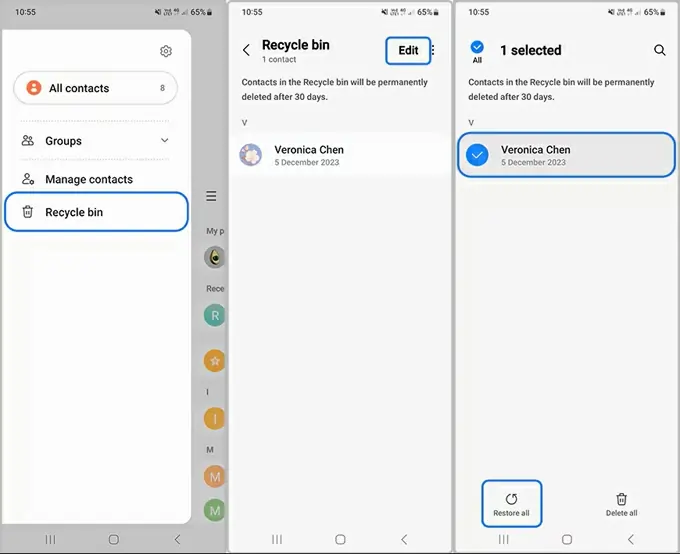
Many of the latest Android devices (like Samsung or Xiaomi) come with an in-built Recently Deleted or Trash folder, which temporarily stores all your deleted contacts. Your lost contacts remain in this folder for some specific days (say 30 days) and then get permanently erased.
Before you apply any advanced method for contact recovery, it is important to check this folder. All you have to do is:
- Launch the Contacts app on your Android phone.
- Click on your profile icon from the top panel and tap the “Trash” or “Recently Deleted” option.
- Select the deleted contacts that you need to restore.
- Click Restore and wait while the selected contacts are synced back to your phone.
Method 02: Restore Contacts from Google Contacts Backup
If your Android device is synced with the cloud backup services, such as Google account, restoring deleted contacts becomes very easy. Follow the below steps to recover your deleted contacts using Google Contacts backup:
- Open any browser on your PC and go to Google Contacts.
- Log in to your Google account and tap “Trash” from the left panel.
- Now, locate and select the deleted contacts that you need to restore.
- Click on Restore and wait till the process completes.
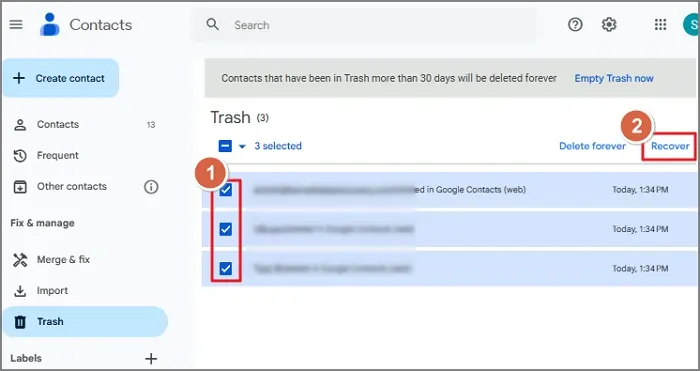
Note: Google keeps deleted contacts in the Trash for up to 30 days. After that, they are permanently deleted.
Method 03: Recover Using Third-Party Software for Android Data Recovery
Contact recovery is possible even if you don’t have any of the above backups. In such a case, you can use third-party free android data recovery software to restore your deleted contacts. Tools like Stellar Data Recovery for Android are especially designed to recover deleted or lost data directly from Android devices. This software performs a thorough scanning of your phone’s internal memory to locate traces of deleted contacts and restores them safely. Along with contacts, you can use this software to recover deleted files of various types, including photos, videos, documents, and more.
When Should You Use the Stellar Data Recovery for Android Tool?
Using a professional software for Android data recovery is helpful in various scenarios, including:
- If your contacts are permanently deleted from your Google account
- Your Android phone has been factory reset.
- Contacts disappeared after a system crash
- Data is not available in SIM or storage
If any of these situations apply, using Android data recovery software is the easiest and most convenient solution.
Steps to Recovery Contacts Using Stellar Data Recovery for Android
Follow these simple steps to recover your contacts using the tool:
Step 1: Download and install the Stellar Data Recovery for Android software from its official website on your Windows or Mac systems. Also, connect your Android phone to that device using a USB cable.
Step 2: Go to your phone’s Developer Options and enable USB Debugging. This allows the software to access your device data.
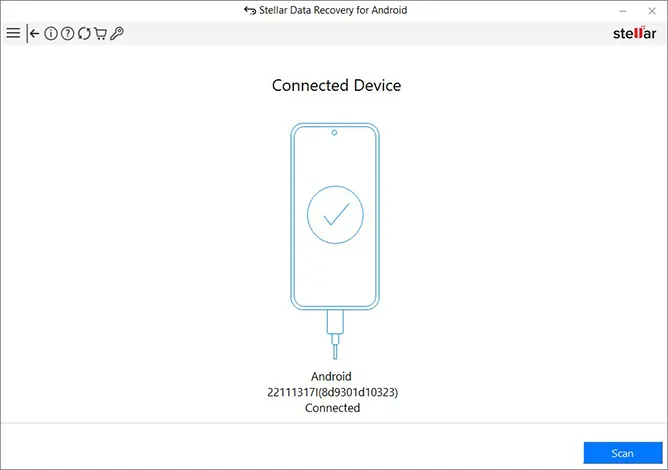
Step 3: Once connected, launch the software on your PC and select Recover Android Data and choose Contacts. Click Next to continue.
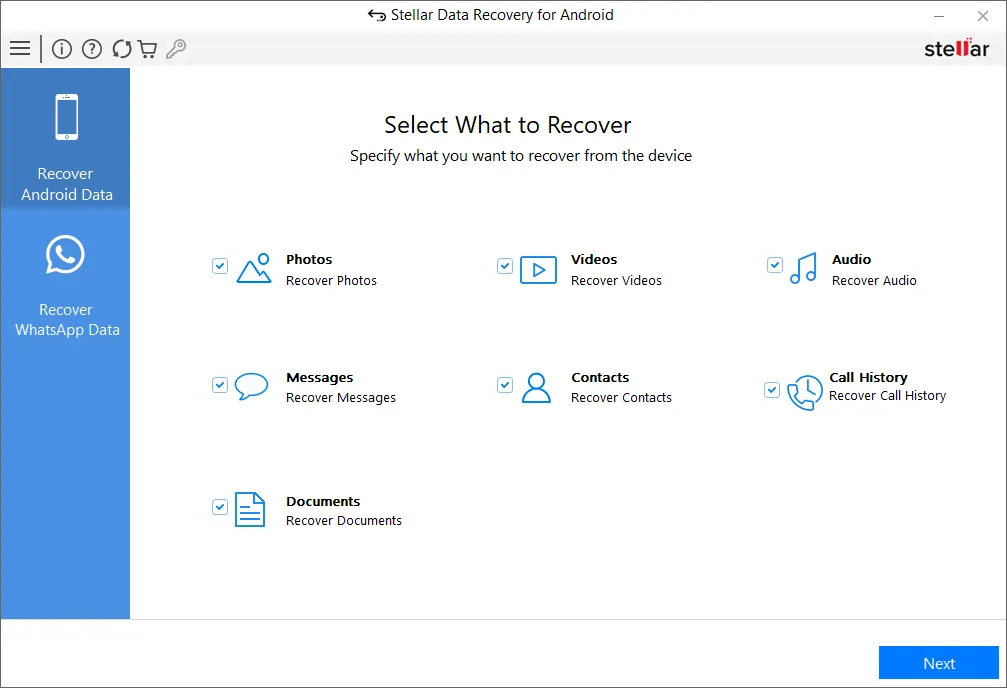
Step 4: Click on the Scan button to begin searching for deleted contacts. The software will perform a deep scan of your device.
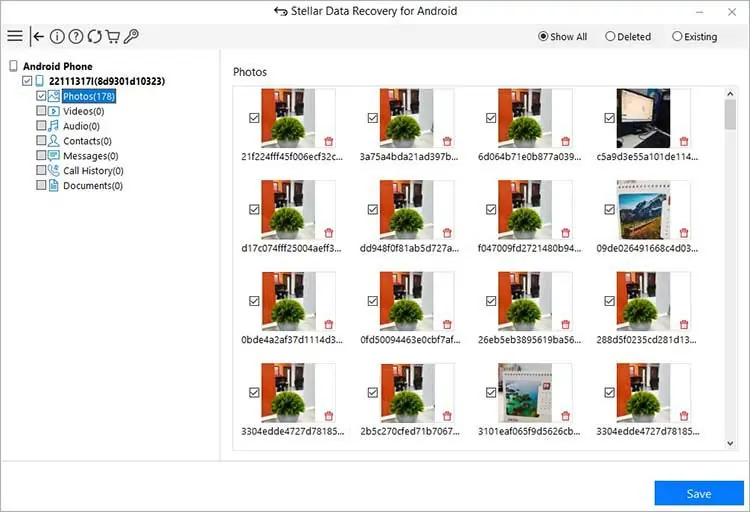
Step 5: After scanning, you can preview the recovered contacts. Select the desired contacts and click on Save to save them to your computer or directly back to your phone.
Is It Safe to Use?
Yes, Stellar Data Recovery for Android is a trusted solution widely used for Android data recovery. It does not modify your existing data and ensures secure recovery processes.
Related Post: Online AI Photo Editing Made Simple with Vidmud
Conclusion
Restoring deleted contacts on an Android phone may seem like a challenging task, but it is easier than most people think. You can use built-in features like Google Contacts backup, cloud sync, and local backups to recover your lost contacts within minutes. However, if you don’t have any backup, use third-party software from Android data recovery. The key is to act quickly and use the right method based on your situation. Whether you rely on Google backup, SIM storage, or recovery software, there’s a high probability of getting your contacts back.
Frequently Asked Questions (FAQs)
Can I recover permanently deleted contacts on Android phones?
Yes, you can easily recover permanently deleted contacts using the previously created backups or third-party Android data recovery software such as Stellar Data Recovery for Android.
How long does Google keep deleted contacts?
Google stores deleted contacts in the Trash folder for up to 30 days, after which they are permanently removed automatically.
Does a factory reset delete contacts permanently?
Yes, a factory reset deletes contacts permanently unless they are previously backed up to Google account, cloud storage, or other backup solutions.